
Download Toolbar Cleaner – Utility, Productivity, Browser Optimization
Overview
Toolbar Cleaner is a focused utility application designed to address a common yet often overlooked issue in desktop browsing: the accumulation of unnecessary toolbars and Browser Helper Objects (BHOs). These intrusive add-ons can slow down browsing performance, alter default search settings, and clutter the browser interface, leading to a frustrating user experience. The app provides a streamlined solution by detecting and removing such components with minimal user effort. It is particularly useful for users who have noticed a decline in browser speed or have encountered unwanted changes to their homepage or search engine after installing third-party software.
Targeted primarily at general computer users and individuals seeking to maintain a clean, efficient browsing environment, Toolbar Cleaner serves as a valuable tool for reclaiming control over their web experience. It is especially beneficial for those who frequently install software from third-party sources, where bundled toolbars are common. The developer, Jason A. Bilbrey, has created a lightweight, no-frills application that prioritizes functionality over complexity. Although specific details about the developer’s background were not provided, the app’s consistent release history and straightforward design suggest a commitment to reliability and user-centric development.
Real-world use cases include cleaning up a browser after installing free software, restoring default search settings, or improving system responsiveness. In the broader software ecosystem, Toolbar Cleaner fills a niche role by offering a dedicated tool for browser hygiene—a function often overlooked by mainstream antivirus or system cleanup utilities. Its presence underscores the importance of specialized tools in maintaining digital well-being.
Key Features & Functionality
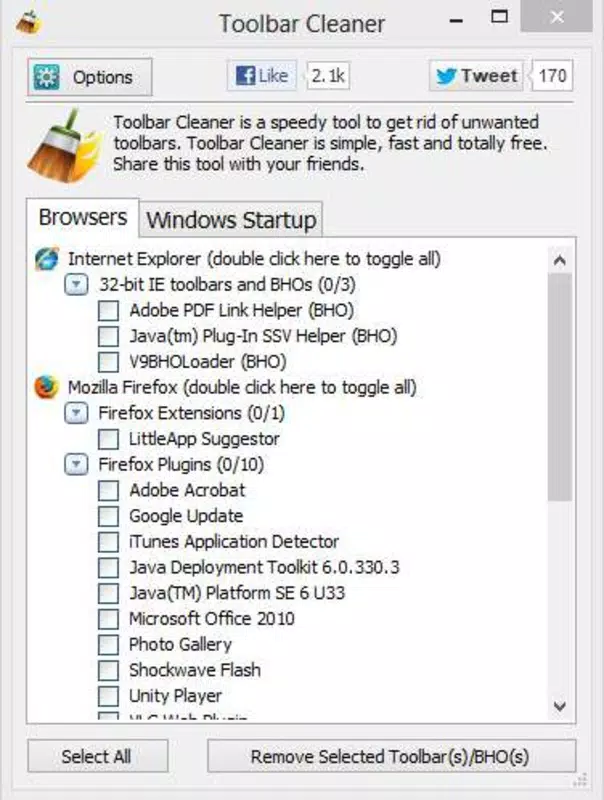
- Easy to Use Interface: The app launches quickly and displays a clear list of installed toolbars after a brief scan. Even users with limited technical knowledge can navigate the tool without difficulty, thanks to its straightforward layout and minimalistic design.
- Bulk Uninstallation Capability: Users can select multiple toolbars simultaneously and remove them in one action, significantly reducing the time and effort required compared to manual removal through system settings.
- BHO Detection and Removal: Beyond standard toolbars, the application identifies Browser Helper Objects—common sources of unwanted behavior such as redirecting searches or injecting ads—ensuring a more thorough cleanup.
- Browser Compatibility: Toolbar Cleaner supports two major desktop browsers: Internet Explorer and Mozilla Firefox. This focus allows the tool to deliver optimized performance and reliable results on these platforms.
- Fast Scanning and Results: The scan process completes in seconds, providing immediate feedback and enabling users to take action without delays. This efficiency enhances the overall user experience and supports quick browser maintenance.
For example, a user who installed a free PDF converter and later found their browser’s homepage changed can use Toolbar Cleaner to scan and remove the associated toolbar and BHO in under a minute. Similarly, someone managing multiple browsers on a single machine can use the tool to maintain consistent performance across both Internet Explorer and Firefox without switching between different cleanup methods.
Interface, UX & Performance
The user interface of Toolbar Cleaner is minimal and purpose-driven, reflecting its utility-focused design. The main window displays a list of detected toolbars and BHOs, with clear labels and checkboxes for selection. Navigation is intuitive, requiring no learning curve—users simply launch the app, wait for the scan to complete, and proceed with removals. The layout avoids clutter, prioritizing functionality over decorative elements.
Performance is consistent with the app’s lightweight nature. Although the developer did not list formal performance metrics, the tool operates efficiently on standard desktop systems. It consumes minimal system resources during scanning and removal, ensuring it does not interfere with other running applications. Responsiveness is strong, with scan results appearing within seconds and no noticeable lag during selection or uninstallation.
Stability is another key strength. The application does not exhibit crashes or unexpected behavior during typical use, and the removal process is handled safely, without modifying unrelated system components. While compatibility with different hardware configurations was not specified, the app’s small file size and low resource demands suggest broad usability across various desktop environments.
Platform Compatibility & Technical Requirements
Toolbar Cleaner is designed for the Windows platform and is compatible with Windows operating systems. The application’s file size is 1.2 MB, indicating a lightweight footprint that ensures quick installation and minimal storage impact. The software version is 1.0, suggesting a stable, finalized release with no known major bugs or incomplete features.
Although the developer did not specify minimum OS requirements, the app’s release date of November 8, 2012, implies it was built for older Windows versions such as Windows 7 or earlier. Users on newer systems may still be able to run it, but compatibility is not guaranteed. The app does not require administrator privileges for basic operation, though removal of certain system-level components may prompt standard permission prompts.
Pros and Cons
Pros
- Lightweight and fast, with minimal system impact
- Simple, intuitive interface suitable for all user levels
- Supports bulk removal of toolbars and BHOs
- Efficient scanning and immediate results
- Free to download and use
Cons
- Only supports Internet Explorer and Firefox, limiting browser coverage
- Not available for mobile or macOS platforms
- Release date is over a decade old, raising compatibility concerns with modern systems
- No update history or future development signals provided
- Developer details were not disclosed beyond the name
FAQ
Is Toolbar Cleaner safe to use?
Yes, the application is designed to remove only toolbars and BHOs that are known to interfere with browser performance. It does not modify core system files or install additional software.
Can I use Toolbar Cleaner on Windows 10 or 11?
While the app was released in 2012, it may still run on Windows 10 and 11. However, compatibility is not guaranteed due to changes in system architecture and security policies.
Does Toolbar Cleaner work on macOS or Linux?
No. The app is exclusively designed for Windows and is not available for macOS or Linux operating systems.
Is there a mobile version of Toolbar Cleaner?
There is no mobile version of Toolbar Cleaner. The application is intended for desktop use only.
How often should I run Toolbar Cleaner?
It is recommended to run the tool periodically—such as after installing new software or noticing browser slowdowns—to maintain optimal browsing performance.
Final Thoughts
Toolbar Cleaner remains a niche but effective utility for users dealing with browser clutter and unwanted add-ons. Its simplicity, speed, and focus on core functionality make it a reliable tool for maintaining browser health. While its age and limited platform support are notable drawbacks, its lightweight design and zero cost offer significant value for users still running older Windows systems or seeking a no-nonsense cleanup solution.
For anyone frustrated by intrusive toolbars or BHOs in Internet Explorer or Firefox, this app delivers a straightforward, secure, and efficient way to reclaim control. Despite its outdated release date, it continues to serve a real need in the digital maintenance toolkit.
Download Toolbar Cleaner now


